Logo
Submit a request
Sign in
  1. Health Mart
  2. Interacting with Dashboards

Articles in this section

  • Exploring Dashboards
  • Interacting with Filters
  • Working With Time Frames

Working With Time Frames

RI-BIT Enables you to select many pre-defined time ranges so you can easily identify trends in your data.

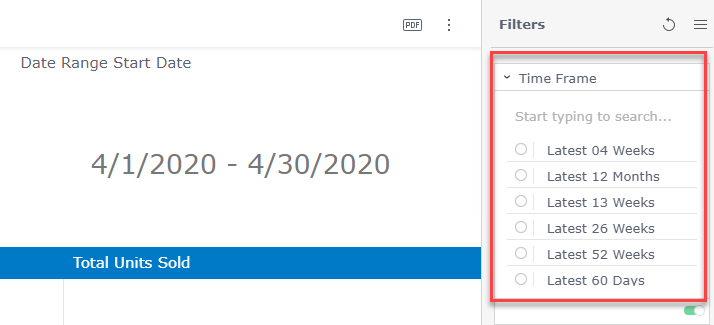
Simply select the time frame from the Time Frame Filter and the dashboard will update with the selected time.
mceclip0.png

In addition the widget next to Time Frame will automatically update to show you what dates are being shown in the selected Time Frame.

Was this article helpful?
0 out of 0 found this helpful
Have more questions? Submit a request
Return to top

Copyright © Health Mart. All rights reserved.

Zendesk Theme Designed by Diziana